
If you own a small business in Calgary, when did you last check how fast your website loads on a phone?
Most owners never do. The website looks fine on the office computer, so everyone assumes it works. But your customers are on their phones, often on mobile data, and Google measures how your site performs for them, not for you.
This month we put our own three websites through Google’s free speed test: sbqs.ca, sbqsaccounting.ca and calgarytaxfiling.ca. We build websites for a living, and we still found problems we didn’t know about. Here is what we found, what we fixed, and how you can check your own site in two minutes.
What Google PageSpeed Insights Measures
PageSpeed Insights is a free tool from Google. You type in your website address, and it tests your site on a simulated mid-range phone and on a desktop computer. It gives you scores out of 100, where 90 or more is green, 50 to 89 is orange, and below 50 is red.
- Performance: how quickly your page appears and becomes usable. On mobile, every second counts. People leave slow pages before they ever see your phone number.
- Accessibility: whether everyone can use your site, including people with low vision or who use screen readers. Hard-to-read text and unlabelled buttons lower this score.
- Best Practices: whether your site is secure and error-free, for example loading everything over a secure HTTPS connection.
- SEO: whether Google can read and understand your pages so they can show up in search results.
- Agentic Browsing: a newer check of how easily AI assistants can read and use your site. More customers now ask AI tools to find a local accountant or web designer, so this is worth watching.
What We Found on Our Own Websites
All three sites looked fine when we visited them ourselves. The test told a different story.
- Some visitors were seeing an error page. On one site, a security plugin needed more server memory than the hosting allowed. Logged-in, we saw the site normally. Some visitors, and Google, got a blank error page instead.
- Pages were slow to appear on phones. One site took about 5.6 seconds to show anything on a phone. Large style files and an oversized banner image had to download before the page could appear.
- Some text was hard to read. White text on gold buttons and grey text on dark footers looked stylish, but it was too faint for many people to read easily.
- Two buttons led nowhere. A “Get In Touch” button and a “Privacy Policy” link pointed to pages that no longer existed. Visitors who clicked them got a “page not found” message.
- One font loaded insecurely. A theme font was requested over an old, insecure connection, so browsers blocked it and logged an error.
None of these showed up in day-to-day use. That is exactly why they matter: you can’t fix a problem you never see.
What We Fixed, and the Results
Most of the fixes were small changes in settings, not a redesign:
- Fixed the server memory limit, so every visitor gets the real page, every time.
- Turned on file compression and caching, so pages download as smaller files and load faster.
- Delayed the spam-protection script (reCAPTCHA) until a visitor actually starts using the page, instead of loading it upfront on every page.
- Removed a plugin we no longer used, which was still adding extra code to every page.
- Darkened colours and underlined links, so text and buttons are easy to read for everyone.
- Repaired the broken links and loaded the font securely.
- Stopped the page from jumping while it loads, so content stays where it first appears.
Here are the mobile scores before and after:
| Website | Performance before | Performance after | Accessibility before | Accessibility after |
|---|---|---|---|---|
| sbqs.ca | 78 | 100 | 88 | 100 |
| calgarytaxfiling.ca | 99 | 99 | 87 | 100 |
| sbqsaccounting.ca | 61 | 77 | 93 | 100 |
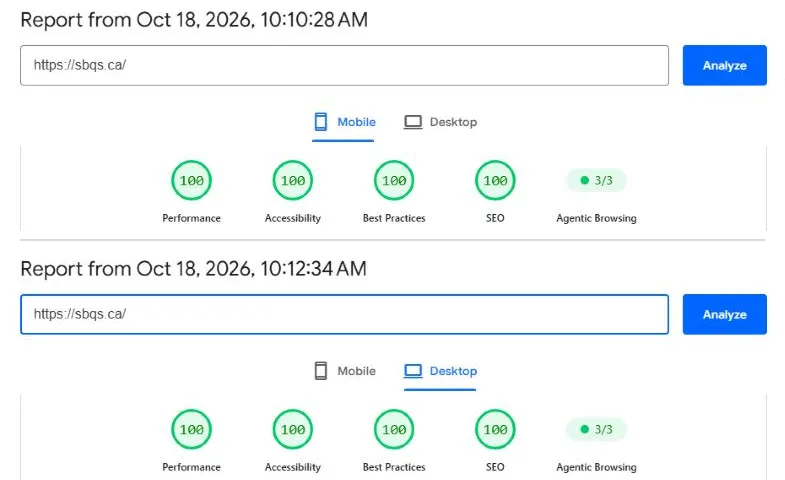
sbqs.ca now scores a perfect 100 in every category on both mobile and desktop, and calgarytaxfiling.ca is at 99 to 100 across the board. sbqsaccounting.ca is our work in progress: the next step is optimizing its large banner image.
Check Your Own Website in Two Minutes
- Go to pagespeed.web.dev and type in your website address.
- Look at the Mobile results first. That is what most of your customers see.
- If Performance is below 90, or any score is orange or red, scroll down. Google lists what is slowing your site, with the biggest problems first.
- Open your website on your own phone, using mobile data rather than Wi-Fi, and try the main buttons: Call, Contact, Book.
- Test again after any big change, like a new plugin, theme update or new page builder.
A few honest notes from our experience:
- Scores move a little between tests. A score of 88 one minute and 91 the next is normal. Look at the trend, not one test.
- A higher score is not the goal by itself. The real goal is a site that loads fast, works for every visitor, and never shows an error. The score is just the easiest way to check.
- Small settings make big differences. Most of our improvements came from settings and clean-up, not from rebuilding the website.
How SBQS Can Help
If your scores are orange or red, or you simply don’t have time to deal with it, that is what we are here for.
At SBQS Ltd., we build and maintain WordPress websites for Calgary small businesses. We apply the same checks and fixes to our clients’ websites that we applied to our own: speed, accessibility, security and search visibility.
Book a free consultation, and we’ll run your website through the same test and walk you through the results in plain language.
Phone: (587) 700-8888 · Website: sbqs.ca · Email: monakabir@sbqs.ca